Public opt-in evidence for Twilio A2P 10DLC compliance · fixmysticks.net
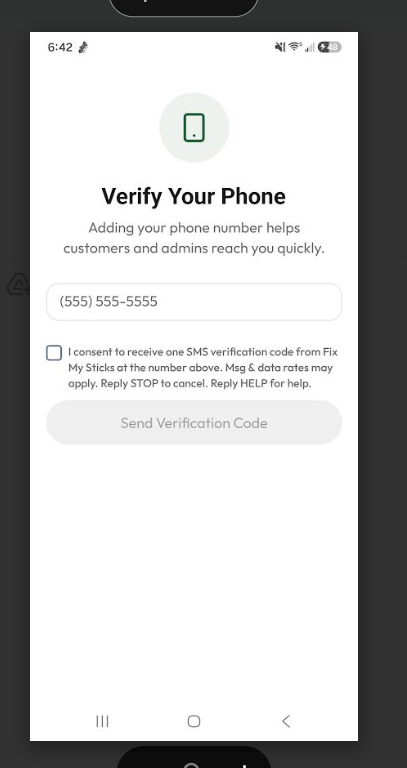
Direct opt-in screenshot image: https://fixmysticks.net/sms-optin.jpg
End users opt in through the following sequence within the Fix My Sticks mobile app:
The user downloads the Fix My Sticks app (available on iOS and Android) from fixmysticks.net. On the Role Selection screen they tap "Offer Repairs" to begin the provider registration flow.
The provider enters their name and email address to create an account, then verifies their email address via a 6-digit OTP sent to their email.
After email verification, the provider lands on the Phone Verification screen. This is where explicit SMS consent is obtained. The screen displays:
Exact consent text displayed beside the checkbox:
"I consent to receive one SMS verification code from Fix My Sticks at the number above. Msg & data rates may apply. Reply STOP to cancel. Reply HELP for help."
The "Send Verification Code" button is disabled until the user explicitly checks the consent checkbox. The checkbox is never pre-selected. Users may leave the screen without checking the box.
After tapping "Send Verification Code," a one-time 6-digit SMS is sent to the number provided. The message takes the form:
Your Fix My Sticks verification code is: 563057. It expires in 10 minutes. Reply STOP to opt out.
The user enters the 6-digit code on the next screen. Once verified, the phone number is confirmed and registration continues. No further SMS messages are sent.
This is the exact screen where consent is collected. The user must actively check the unchecked consent checkbox before the "Send Verification Code" button becomes enabled. The checkbox is not pre-selected. Users may leave the screen without checking it.
Both documents include the full SMS / text messaging section with CTIA-required disclosures.
All SMS messages sent by Fix My Sticks identify the brand by name and include opt-out language:
Your Fix My Sticks verification code is: 563057. It expires in 10 minutes. Reply STOP to opt out.
Fix My Sticks: Your phone verification code is 847291. Do not share this code with anyone. Reply STOP to cancel.
Fix My Sticks: 392841 is your verification code. Valid for 10 minutes. Reply STOP to opt out.